
 Send Inquiry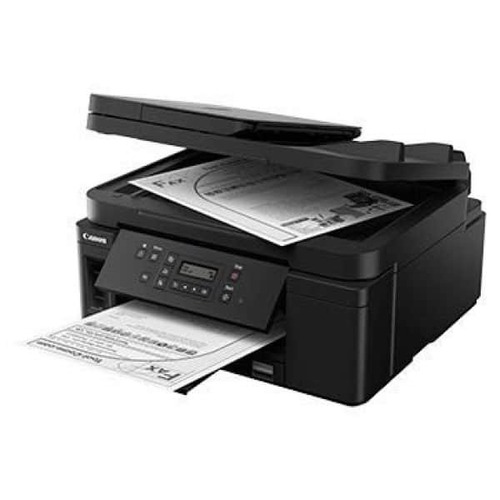
PIXMA GM4070 PRINTER
Product Details:
- Processor Type 32-bit RISC
- Weight 6.4 kg
- Print Technology Inkjet
- Function Print, Copy, Scan
- Noise Level Approximately 53.5 dB(A)
- Print Speed 13 ipm (black)
- Capacity 250 sheets (input tray)
- Click to View more
PIXMA GM4070 PRINTER Price And Quantity
- 20995 INR/Piece
- 1 Piece
PIXMA GM4070 PRINTER Product Specifications
- Inkjet
- Built-in power adapter
- 600 x 1200 dpi
- AC 100-240V, 50/60Hz
- Document Printing, Photocopying, Scanning
- 6.4 kg
- 5°C - 35°C
- USB 2.0, Wi-Fi, Ethernet
- 32-bit RISC
- Office, Home, Commercial
- A4
- 250 sheets (input tray)
- High yield ink tank, Wireless, Auto Duplex, High-volume printing
- Automatic
- 13 ipm (images per minute)
- Plastic
- 10 - 90% RH (no condensation)
- 13 ipm (black)
- Approximately 53.5 dB(A)
- Plastic Body
- <18W
- Print, Copy, Scan
- 360 MHz
- New
- 403 x 369 x 166 mm
- 2-Line LCD
- IEEE802.11 b/g/n
- Plain Paper, Photo Paper, Envelopes
- Approx. 9 sec (black), 14 sec (color)
- Pigment black ink bottle
- Integrated ink tank system
- GI-90 Black
- Windows, Mac OS
- Canon PRINT app, Google Cloud Print, AirPrint
- Up to 5,000 pages per month
Product Description
High Page Yield Ink Bottle-With high page yield ink bottle 8 300 pages, users can enjoy printing without having to worry about cost of ink, or ink supplies running low.
Optional Colour Printing-Allow users to perform colour document printing*.
*After the colour ink cartridge is depleted, it has to be replaced with new one or the contact protector has to be reinstalled.
Auto Document Feeder-35 sheets of originals can be loaded for batch scanning and copying.
Auto Duplex Printing-Enjoy heightened productivity and ease of use by printing on both sides of papers automatically.
2-Way Paper Feeding-Paper can be loaded for printing in 2 directions, via front cassette and rear feeding, eliminating the need to remove paper stacks and reloading.
Mobile and Cloud Printing-With the Canon PRINT Inkjet/SELPHY mobile app for iOS and Android OS, you can print documents stored in local device memory, or cloud storage.
High-Yield Ink Tank for Efficient Printing
Equipped with a refillable, integrated ink tank system and GI-90 pigment black ink bottle, the PIXMA GM4070 delivers thousands of pages on a single refill. This makes it perfect for users who demand low running costs and minimal maintenance, whether in a busy office or at home. Refilling is hassle-free, further reducing downtime and enhancing productivity.
Versatile Connectivity and Mobile Printing
With built-in Wi-Fi, Ethernet, and USB 2.0, the GM4070 offers flexible connection options to suit diverse workspaces. Mobile printing is a breeze using the Canon PRINT app, Google Cloud Print, and AirPrint, making it easy to print from smartphones or tablets. This ensures seamless printing no matter how or where you work.
Designed for Productivity and Ease of Use
A spacious 250-sheet input tray, automatic duplex printing, and a swift first print out time let you handle large jobs effortlessly. The durable build, intuitive 2-line LCD, and quiet operation (at approximately 53.5 dB(A)) guarantee a user-friendly experience. Its ideal for commercial, home, or office use where performance and reliability are key.
FAQs of PIXMA GM4070 PRINTER:
Q: How do I refill the ink on the PIXMA GM4070 printer?
A: The PIXMA GM4070 features an integrated ink tank system that uses the GI-90 black ink bottle. Simply open the tank cover, insert the bottle nozzle, and let the ink flow carefully into the tank until it reaches the specified fill line. This process is mess-free and can be accomplished in just a few minutes.Q: What types and sizes of paper does the PIXMA GM4070 support?
A: This printer supports plain paper, photo paper, and envelopes up to a maximum size of A4. It can handle diverse printing needs with an input tray capacity of 250 sheets, making it suitable for large document batches and various paper types.Q: When should I perform maintenance on the PIXMA GM4070?
A: Routine maintenance, such as cleaning the print head or checking ink levels, can be performed via the printers settings menu or using the Canon PRINT app. Its recommended to perform these tasks whenever print quality declines or after long periods of non-use to ensure optimal performance.Q: Where can I access mobile printing with this printer?
A: Mobile printing is accessible anywhere as long as your device and the PIXMA GM4070 printer are connected to the same Wi-Fi network. Use the Canon PRINT app, Google Cloud Print, or Apple AirPrint directly from your mobile device for convenient, wireless printing.Q: What are the main benefits of using the PIXMA GM4070 for office work?
A: The GM4070 offers high-yield ink tanks, automatic duplex printing, rapid print speeds of up to 13 images per minute (black), and reliable connectivity (USB, Wi-Fi, Ethernet). These features minimize operational costs and maximize productivity, making it an excellent choice for high-volume office environments.Q: How does the automatic duplex printing work on this model?
A: Automatic duplex printing allows the PIXMA GM4070 to print on both sides of the paper without manual intervention. This feature is activated through printer settings or print dialogue, significantly reducing paper usage and streamlining the document printing process.Q: What operating systems are compatible with the PIXMA GM4070?
A: The printer supports Windows and Mac OS, allowing seamless integration into most office or home IT setups. Driver installation and software updates are available on Canons official website to ensure compatibility with your system.
Price:
- 50
- 100
- 200
- 250
- 500
- 1000+

Other Products in 'Ink Tank Printer' category



Developed and Managed by Infocom Network Private Limited.

